Official Guide
Frequently Asked Questions:
Q. How do I make Game Audio louder than Chat Audio, or Chat Audio louder than Game Audio?
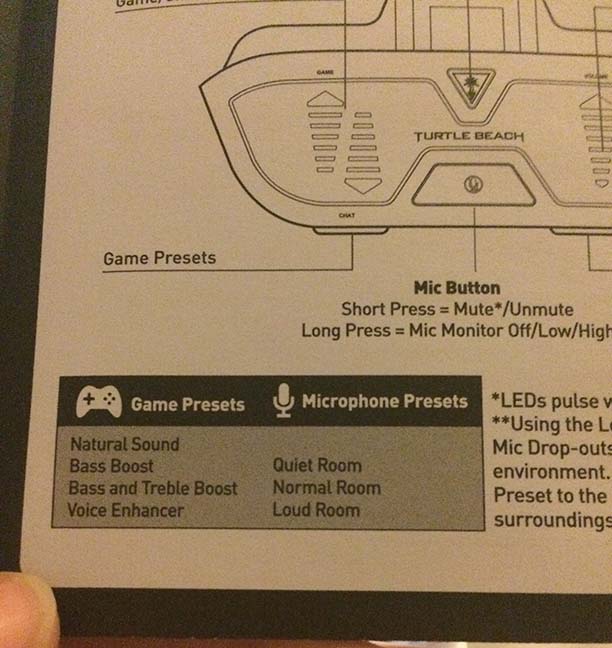
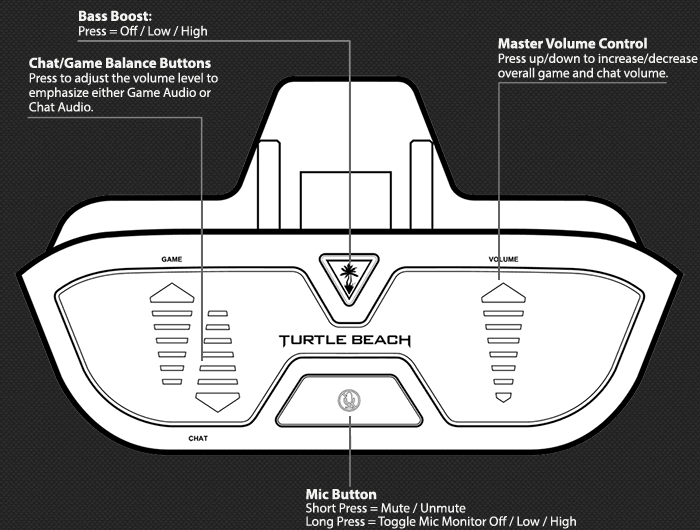
A. First, set the overall volume level you prefer by pressing the Volume button accordingly: Top part of the button = Raise Volume, Lower part of the button = Lower Volume. Then, press the left button in the direction depending on whether you want to make Game Audio louder than Chat, or vice-versa. Pressing the upper part of the button (near GAME) will make Game Audio louder than Chat Audio. Pressing the lower part of the button (near CHAT) will make Chat Audio louder than Game Audio.
Q. I can hear people in chat but I can’t hear the game. What’s wrong?
A. Make sure the Game Balance isn’t turned all the way down; press the upper part of the left button (near GAME) to increase Game audio. Trying to raise the game audio using the volume button will not have any effect if the Game Balance is turned all the way down.
If there is no change, try power cycling the console and Headset Audio Controller (HAC). To do this, disconnect HAC from the Xbox One Controller, then power the Xbox One off completely. Wait 60 seconds, then power the Xbox One back on. Once the Xbox One has completed start-up, plug the adapter back into the Xbox One Controller.
Q. I can hear game audio but cannot hear chat. How do I fix this?
A. First, make sure the Chat Balance is turned up on the adapter. To do this, press the lower part of the left button (near CHAT) to increase the chat audio. Trying to raise the chat audio using the volume button will not have any effect if the Chat Balance is turned down.
If you are still unable to hear chat, check the privacy settings for your account. Go toSettings > Privacy and Online Safety > (Child, Teen, Adult, Custom) and select ‘Communicate with voice and text.’ Select ‘everybody‘ if you are not in a chat with a friend.
If there is no change, try power cycling the console and Headset Audio Controller (HAC). To do this, disconnect HAC from the Xbox One Controller, then power the Xbox One off completely. Wait 60 seconds, then power the Xbox One back on. Once the Xbox One has completed start-up, plug the adapter back into the Xbox One Controller.
Q. When I try to change the volume by pressing the VOLUME button on the right, both the Game and Chat volume go up and down. Is this normal?
A. Yes, the right volume control is designed to raise and lower the overall volume for the headset. To make Game Audio louder than Chat Audio and vice versa, press the left button in the direction that you would prefer to make louder (GAME or CHAT).
Q. How do I raise the Bass Boost on the Headset Audio Controller?
A. To change the Bass Boost Mode, press the button with the Turtle Beach palm tree icon. There are three settings: Off (LED not lit) , Low (LED Low), and High (LED High).
Q. How do I toggle the Mic Monitor?
A. To toggle the Mic Monitor, long press the Mic button. There are three settings: Off (One Tone), Low (Two Tones), and High (Three Tones).
Q. What is the difference between the Headset Audio Controller and the Xbox Stereo Headset Adapter?
A. The Ear Force Headset Audio Controller is manufactured Turtle Beach and features mic monitoring and an additional bass boost control.